
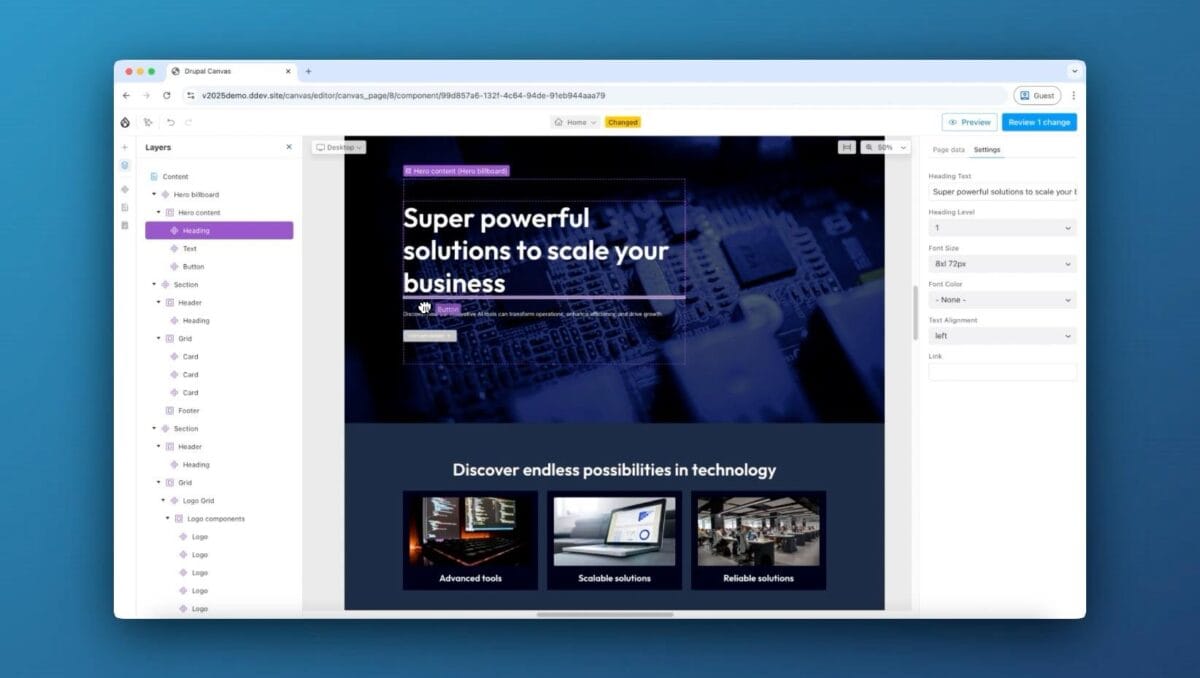
Drupal has always been a powerful CMS for building websites. It gives developers a lot of flexibility and is used for many large and complex websites.
But if you have worked with Drupal, you probably know that it can be a little difficult for someone who is not a developer.
This is where Drupal CMS 2.0 and Drupal Canvas become interesting.
With Canvas, Drupal is moving towards a more visual way of building pages. Instead of depending on a developer for every small layout change, content editors and site builders can create and edit pages visually.
In this blog, I want to share what Drupal CMS 2.0 and Canvas are and why I think they are an interesting step forward for Drupal.
What is Drupal CMS 2.0?
Drupal CMS 2.0 is the newer version of Drupal’s CMS-focused experience.
The main idea is to make Drupal easier to get started with and easier to use, while keeping the flexibility and power of Drupal.
It comes with several improvements, including:
- Drupal Canvas
- Site templates
- Recipes
- Better out-of-the-box functionality
- AI features
- Marketing tools
- Improved site-building experience
For someone who has been using Drupal for years, the biggest thing to notice is the move towards a more visual site-building experience.
What is Drupal Canvas?
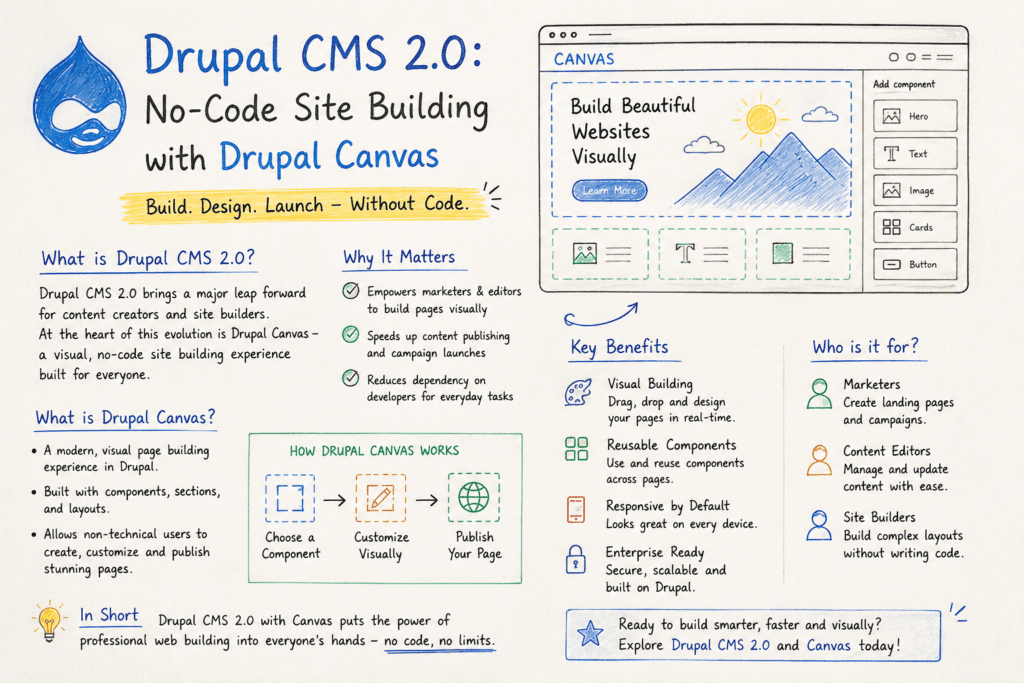
Drupal Canvas is a visual page-building tool for Drupal.
The easiest way to understand it is to think about building a page without having to write HTML or Twig for every section.
For example, you may have components such as:
- Hero
- Text
- Image
- Cards
- Button
- Testimonials
- Other custom components
You can add these components to a page, arrange them and edit the content while seeing the page visually.
This is a big change from the traditional Drupal workflow.
How is this different from traditional Drupal?
In a traditional Drupal project, a developer may need to create the content type, fields, Paragraphs, templates and CSS before an editor can start building a page.
That approach is still useful, especially for complex websites.
But imagine a marketing team wants to create a new landing page.
Instead of creating a ticket for the development team every time, they can use the components that have already been created and build the page themselves.
This can save a lot of time.
Components are the important part
For me, one of the most interesting parts of Canvas is the component-based approach.
Developers can create reusable components and give editors the options they need.
For example, a developer could create a Hero component with:
- Title
- Description
- Image
- Button
- Alignment
The editor doesn’t need to know how the component was built.
They just use it.
This creates a nice separation between development and content editing.
Developers build the components.
Editors use the components.
Does this mean Drupal developers are not needed?
No.
I don’t see Canvas as something that replaces Drupal developers.
There will still be a lot of work that requires development knowledge.
Developers will still need to work on:
- Custom Drupal modules
- Custom components
- Content structures
- Integrations
- APIs
- Performance
- Security
- Permissions
- Custom functionality
The difference is that developers don’t necessarily need to build every individual page for the content team.
Once the components and structure are ready, editors can use them to build pages themselves.
What can editors do with Canvas?
This is where Canvas can be really useful.
A content editor can create a page and use the components available to them.
For example:
Hero → Text → Image → Cards → Call to Action
They can arrange the components and update the content while seeing the page as they build it.
This is much closer to the experience people expect from modern website builders.
Is Drupal Canvas really no-code?
For everyday page building, it can be a no-code experience.
But there is an important difference.
Building and maintaining the components behind Canvas can still require a developer.
So I would describe it like this:
No-code for page building.
Code when you need something custom.
And I think this is actually a good approach.
Drupal doesn’t need to hide its development capabilities. Instead, it can give non-technical users an easier way to use the system.
What does this mean for Drupal projects?
I think Canvas can be particularly useful for organizations where the marketing or content team needs to create pages regularly.
For example:
- Campaign landing pages
- Marketing pages
- Event pages
- Product pages
- Service pages
- Promotional pages
Instead of involving a developer every time, the team can use the existing component library.
This can make the overall process faster.
What about Drupal’s flexibility?
This is one thing I would not want Drupal to lose.
Drupal is powerful because it allows developers to build things exactly according to project requirements.
Canvas should not change that.
Instead, I see Canvas as another layer on top of Drupal.
You can still have your Drupal content structure, custom modules, APIs and integrations.
Canvas simply gives users a better way to build the presentation layer.
Drupal CMS 2.0 is an interesting step
Drupal has traditionally been seen as a CMS mainly for developers and technical teams.
Drupal CMS 2.0 is trying to change that perception.
With Canvas, Drupal is becoming easier for marketers, editors and site builders while still keeping the Drupal foundation underneath.
I think this is important because today’s website teams want both things:
Flexibility for developers and simplicity for content editors.
If Drupal can provide both, it becomes much easier to recommend Drupal for new projects.
Final thoughts
I have worked with Drupal for many years, and one thing I have always liked about Drupal is its flexibility.
But flexibility sometimes comes with complexity.
Drupal CMS 2.0 and Canvas are trying to solve part of that problem.
The interesting part is not simply the drag-and-drop interface.
It is the idea that developers can build a strong component system and then allow editors to use those components to create pages without depending on developers for every small change.
For me, that is the real value of Canvas.
Developers build the foundation.
Editors build the pages.
And if Drupal can make that workflow work well, Drupal CMS 2.0 could make Drupal much more approachable for a wider range of teams.