

If you run WooCommerce and use Wordfence, you may see Insecure Password warnings after a security scan. This happens when Wordfence detects user accounts with weak or commonly used passwords often created for testing purposes. While these weak accounts are a security risk, many of them belong to test users or customers who never completed a purchase.
Running a WooCommerce store comes with many responsibilities, and one of the most important is protecting customer data. At first glance, Wordfence’s Insecure Password messages may look alarming, but what do they really mean? And more importantly, how should you handle them without disrupting your store or losing valuable customer information?
In this article, we’ll break down what the Insecure Password warning means, why it matters for WooCommerce websites, and how you can safely address it, including best practices and a sample cleanup script you can use to remove or reassign accounts securely.
What does the “Insecure Password” warning mean?
When Wordfence runs a scan, it checks all user accounts in your WordPress database. If it finds a customer account that has a very weak or commonly used password, it will flag it with the Insecure Password label.
For example, if a customer created an account with something like “123456” or “password” as their login, Wordfence considers this a risk because:
Such passwords can be guessed easily by hackers.
Even if the account has no orders, it can still be abused for spam or brute-force attempts.
If the account has purchase history, weak protection could expose sensitive order data.
Why you shouldn’t ignore this warning
Weak accounts are more than just a nuisance. They create:
Security risks – Attackers can break in with very little effort.
Fake signups – Some customers or bots may register with weak passwords just for testing.
Data integrity issues – If such accounts have orders, losing them could complicate accounting or support.
That’s why cleaning up these users (or asking them to update their password) is an important maintenance step for WooCommerce stores.
How to check if affected users have orders
Not all weak accounts are equal. Some may just be test accounts with no purchases, while others may belong to real customers. Before removing any account, you should always check for associated orders.
$order_count = wc_get_customer_order_count( $user_id );
If $order_count > 0, the account has orders and should not be deleted.
If $order_count = 0, you can safely consider removing or cleaning up that user.
Safe way to remove insecure accounts
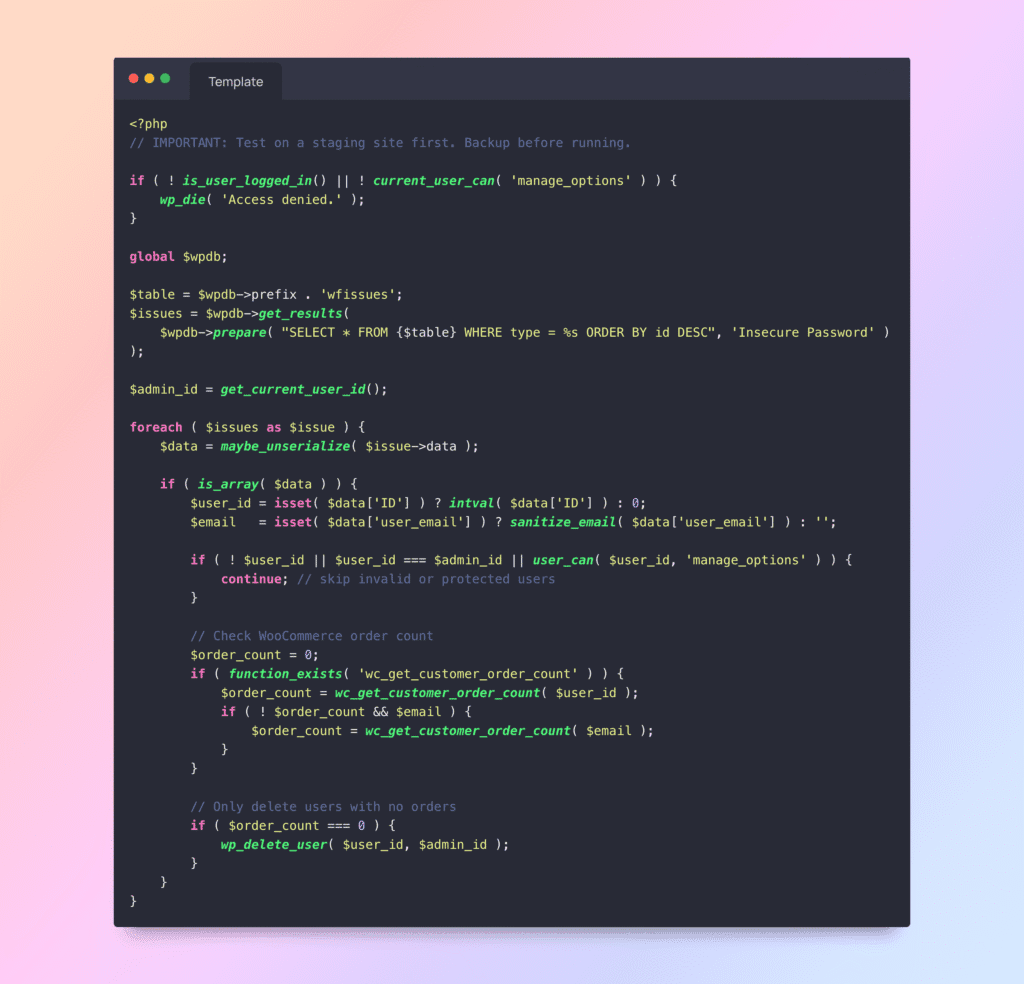
Instead of manually deleting accounts in WordPress, you can automate the process. Below is a safe admin script that:
Scans the Wordfence issues table for Insecure Password users.
Checks whether each user has placed any WooCommerce orders.
Skips admins and your own current account.
Reassigns any user content to your own account (instead of deleting it completely).
Conclusion
Wordfence’s Insecure Password warnings should not be ignored. While many flagged accounts may be test accounts with no orders, others could belong to real customers. By carefully checking order history and applying a safe cleanup script, you can improve your WooCommerce store’s security without risking important customer data.
Keeping your WordPress and WooCommerce environment clean, secure, and well-maintained ensures smoother operations and stronger protection against threats.